 Squirrel X
Read the flow.
Seize the moment.
Order book, heatmap, footprint, click trading and trading journal, in one fast application. Built for scalping futures (NQ, ES, CL, GC and their micros) on prop firm Rithmic accounts.
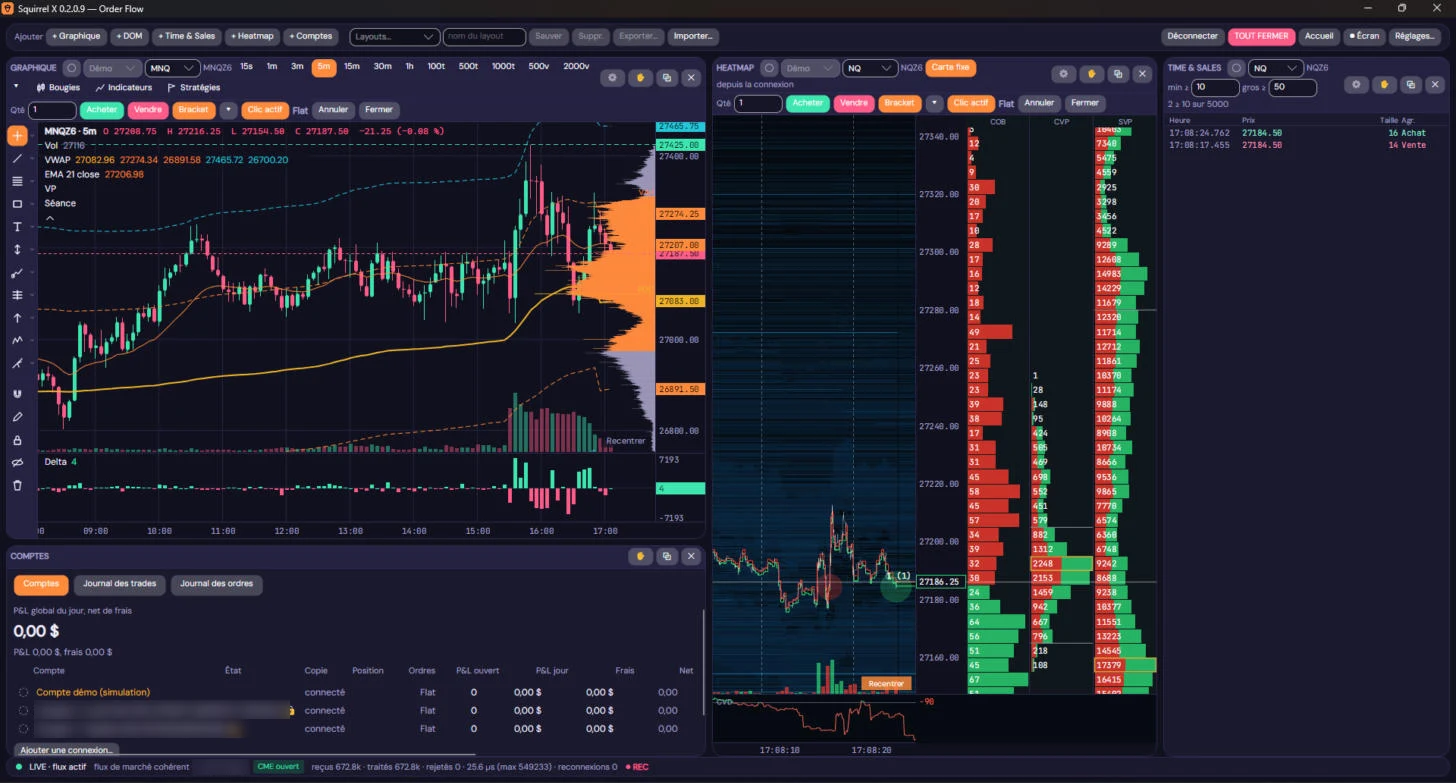
Real screenshot, live Rithmic feed: MNQ 5 min chart, NQ heatmap, Time & Sales.
The order book that talks
A fast DOM for click trading, and a column that tells you what is happening in the book instead of just displaying it.
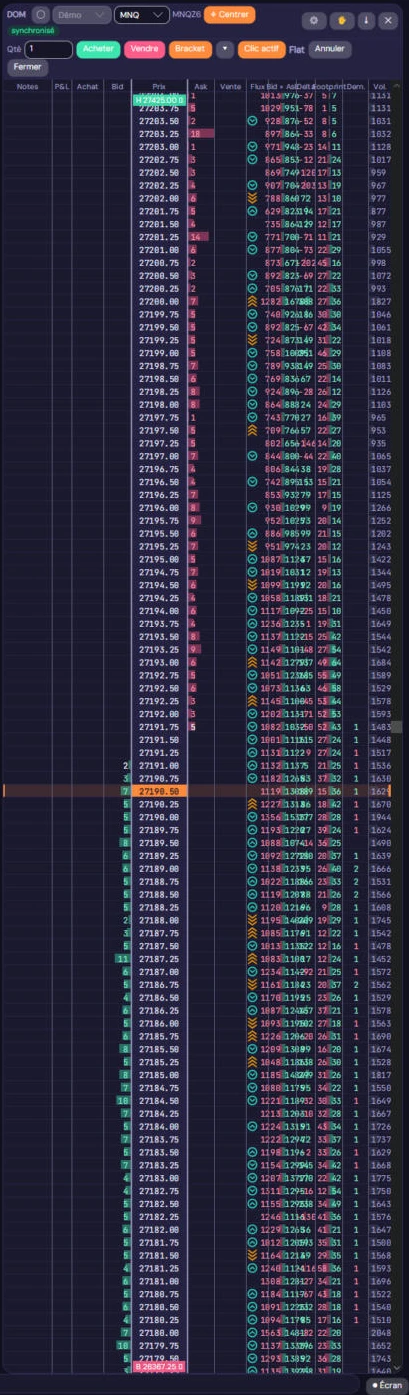
- Click tradingBuy and sell straight from the book, stop and target brackets, orders dragged with the mouse, “Flat” and cancel in one move.
- Book flowIcebergs, sweeps, absorptions, walls placed, pulled or broken, spoofing, exhaustion of a move, trapped buyers or sellers: every event has its icon, its thresholds and its explanation on hover.
- What traded at each priceSession Bid × Ask and delta, footprint of the current candle, last trade, volume.
- Price markersDay high and low, POC and value area, your indicator levels, draggable price alerts.
Minimal or sophisticated: you decide
The book is configurable from top to bottom. Three columns, Bid, Price, Ask, for a clean DOM, or the full flow analysis in front of you: every element can be added, removed and tuned.
You choose what you see
Every column can be shown or hidden: working orders, order count, flow, Bid × Ask, delta, footprint, last trade, volume, P&L by price, indicator notes.
Where you want, the size you want
Columns are moved with the mouse and resized; row height, text size, automatic or edge recentering.
Your taste
Bid, Ask, last price, bars, separators, price frame, day high and low: everything can be colored, with ready-made themes.
Your gestures, your orders
What each click does, left or right, above or below the price, on an order or on the position: all of it is configurable.
Signals à la carte
Each book event is switched on separately, with its color, its thresholds and how long its icon stays.
Once and for all
A setting applies to one book or to all of them, and becomes the template for the next ones.
Several accounts, one book each
Trading several prop firms at once? Open one book per account, even on a single screen.
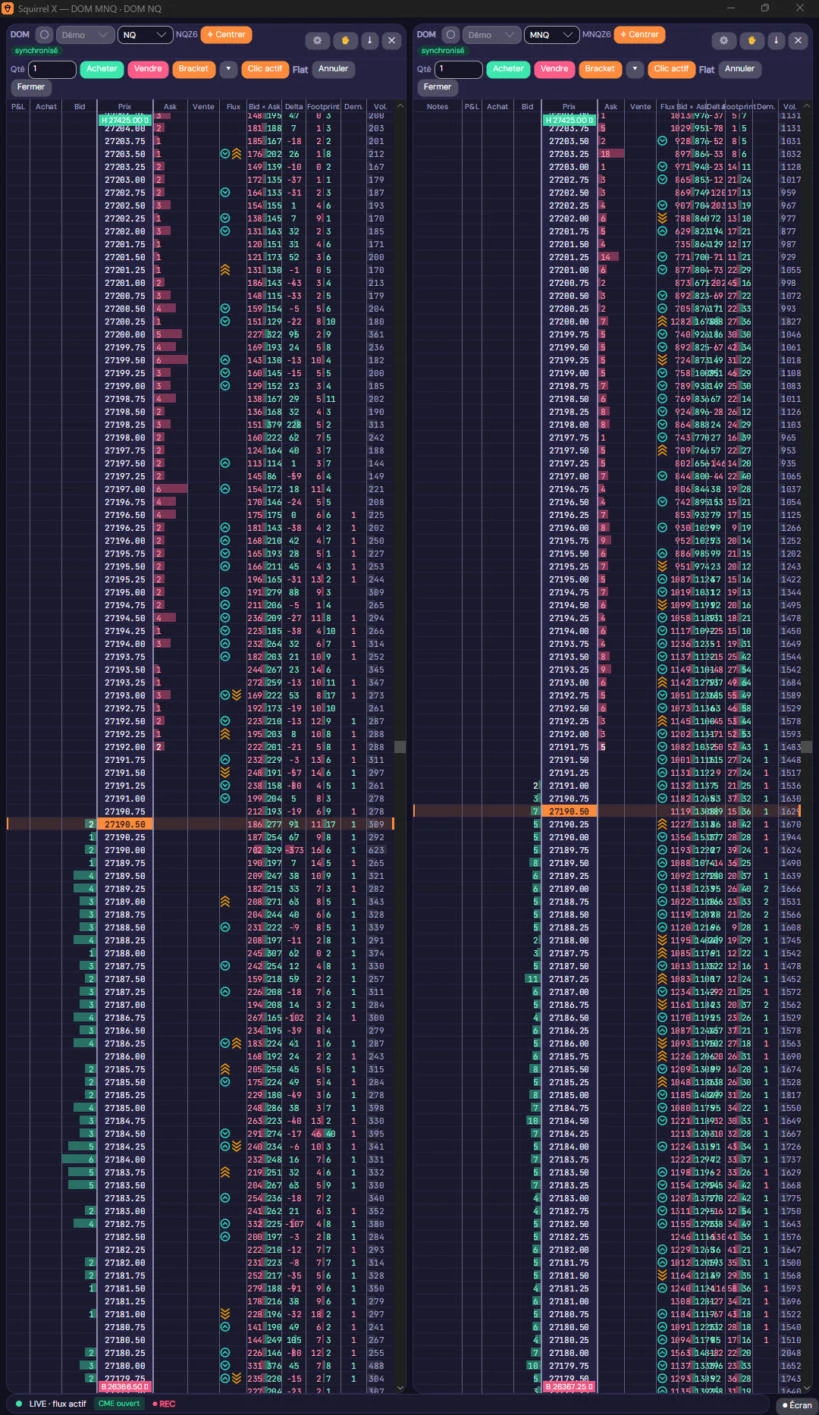
- One book per accountEach book picks its account in its header: the position, orders and P&L shown are those of that account.
- Side by side, even on one screenBooks line up in columns in the main window, or detach and gather in a single window, on the screen of your choice.
- Color tagsA book, a chart and a heatmap of the same color follow the same instrument and the same account; the color also shows in the account list.
- Order copyingOr a single book for everything: the master account places the order, the followers replicate it with their ratio.
The order book heatmap
Liquidity displayed through time, trades as bubbles on top, and columns that summarize the session on the right.
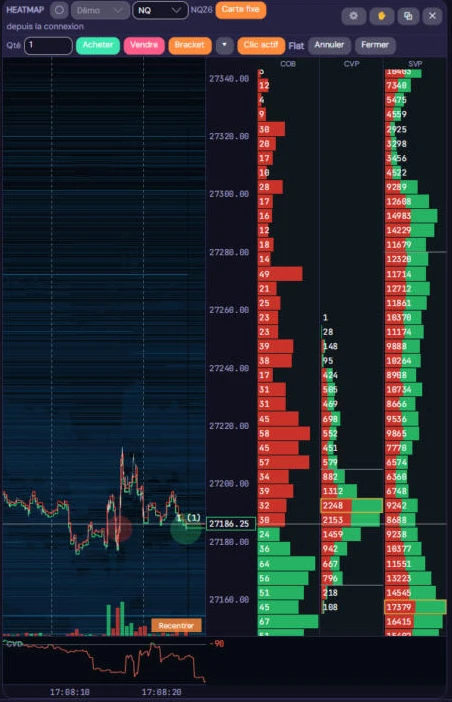
- Historical bookEvery level of the book second by second, adjustable contrast and brightness, time and price zoom with the wheel.
- Trade bubblesAggressive buys and sells at their price and size.
- COB, CVP, SVPCurrent book, session volume and visible volume, as buys and sells or as delta, with POC and value area.
- CVD under the mapCumulative delta, with your choice of scale, zero line and reset.
Charts made for order flow
Time, tick or volume candles, and the tools that matter to read the auction.
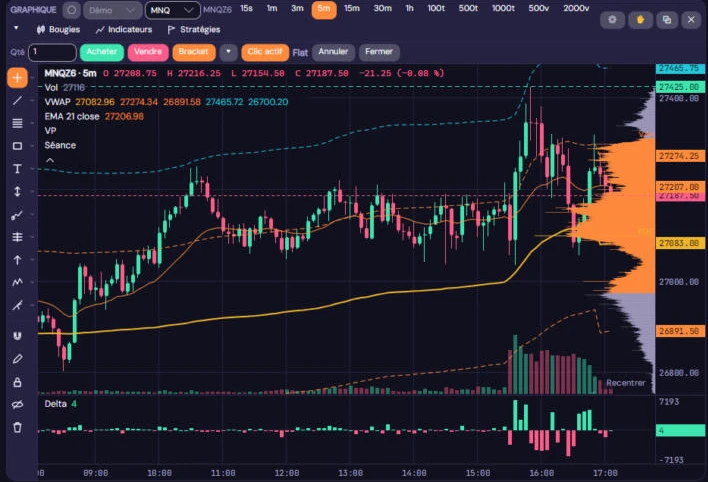
Footprint and imbalances
Sells × buys by price, delta, imbalances and stacked imbalances as zones that hold until price trades through them.
Volume profile
Session, anchored, or composite of the sessions whose value areas overlap, naked POCs, pVAH and pVAL of past sessions, TPO.
VWAP and bands
Session, weekly or monthly VWAP, standard deviation bands of the day and of the previous day.
Delta and CVD
Per candle or cumulative, divergences, CVD candles.
Drawings and alerts
Lines, zones, Fibonacci, long and short positions, alerts on price or on an indicator cross.
Nearly 100 indicators
Moving averages (eleven types, up to eight lines), Bollinger, RSI, pivots, session levels… Each with its own style settings, and several instances of the same one if you want.
Economic releases, on the chart
Never get caught again by a CPI or an NFP in the middle of a position.
One marker per release
Every event of the economic calendar sits at the bottom of the chart, at its time, filtered by impact and by country.
Warned in time
An alert shows at the time of the release, then when the result is published, with the expected figure and the actual one.
Results pushed
Figures arrive as soon as they are published, with nothing to reload.
Nothing missed
Alerts stay in a log, opened in one click from the status bar, with an unread counter.
Your accounts, under control
Several Rithmic connections at once, each panel on the account of your choice.
Multi-account
Several prop firms at the same time, day P&L net of fees, balance and loss limit of each account, renamed as you like.
MLL sent by Rithmic
The liquidation threshold of each account and the margin you have left, with every risk field of the account one right-click away.
Locked by default
A real account receives no order until you have unlocked it yourself. A simulated demo account lets you practice at no risk.
Order copying
One master account, followers with their ratio: orders placed in the application are replicated.
Trade log
Trades and orders of each account, kept from one session to the next, completed at each connection from the server history.
Your trading journal
A real built-in journal that fills itself: every fill of every account goes in, including those made while the application was closed, read back at connection over the last 30 days.
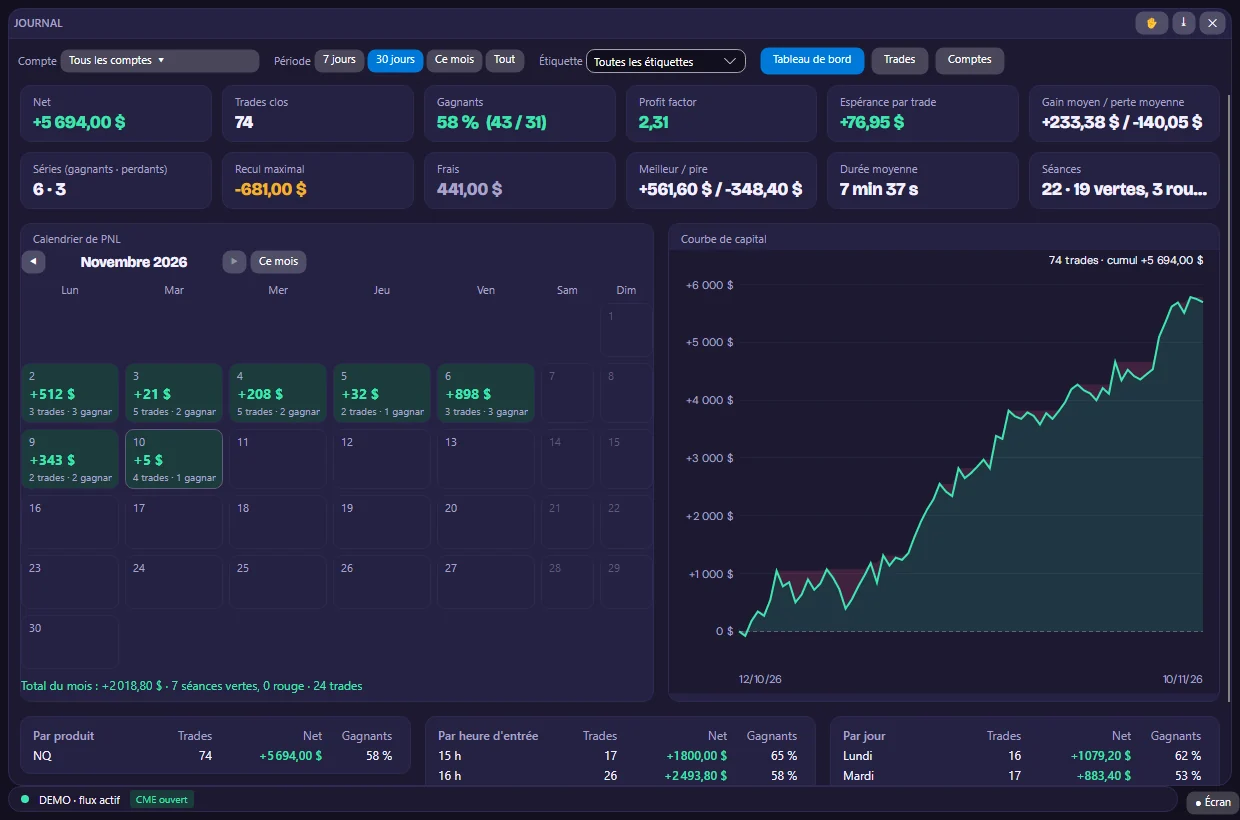
Dashboard filled with a month of sample trades on the demo account.
The dashboard
Net, win rate, profit factor, expectancy, streaks, maximum drawdown, fees, average duration, then the breakdown by product, by hour and by day.
Every session in color
The PNL of each day over the month, with its trades; a click on a cell opens the trades of the session.
Your equity curve
The net total trade by trade, with drawdowns marked.
Every trade annotated
A 1 to 5 star rating, tags (setup, mistake, emotion, and your own) and free text, to filter the whole journal afterwards.
The accounts you tick
One account, all the real ones or two challenges added together: you tick what you want to see, including accounts with no trade.
On its own or in the workspace
The Journal button opens a large window, on the screen of your choice, which docks into the workspace like any panel.
Challenges and funded accounts, tracked closely
Each account has its sheet: type, prop firm rules and price paid. The journal tells you where you stand, and what your challenges cost you against what they brought in.
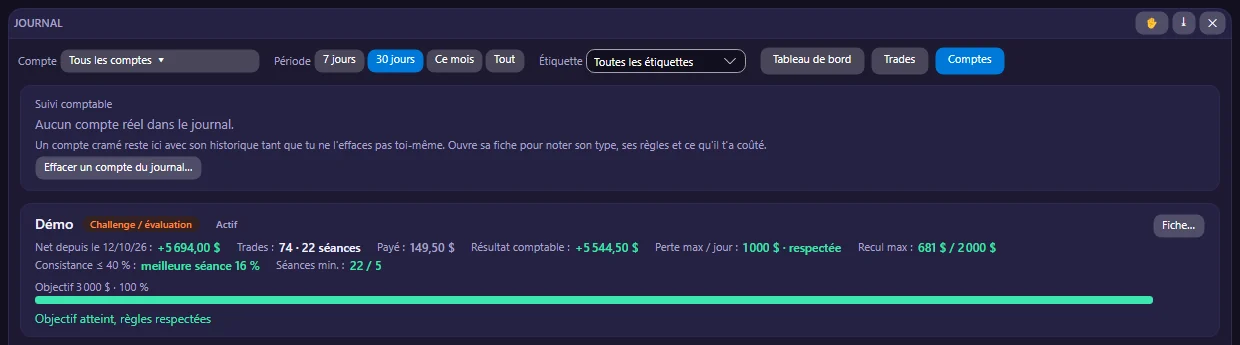
Challenge, PA, real or demo
Profit target, consistency rule, maximum daily loss, static or trailing drawdown, minimum sessions.
The verdict at a glance
Progress toward the target, best session and its share of the total, rules respected or not, gains still to spread for consistency.
What it cost you
The price paid for each challenge or activation, the result net of that price, and the total across all your sheets.
Blown accounts kept
A blown or closed account stays in the journal with its full history, until you delete it yourself.
Your session on one card
The picture of your day, ready to share, from the home page.
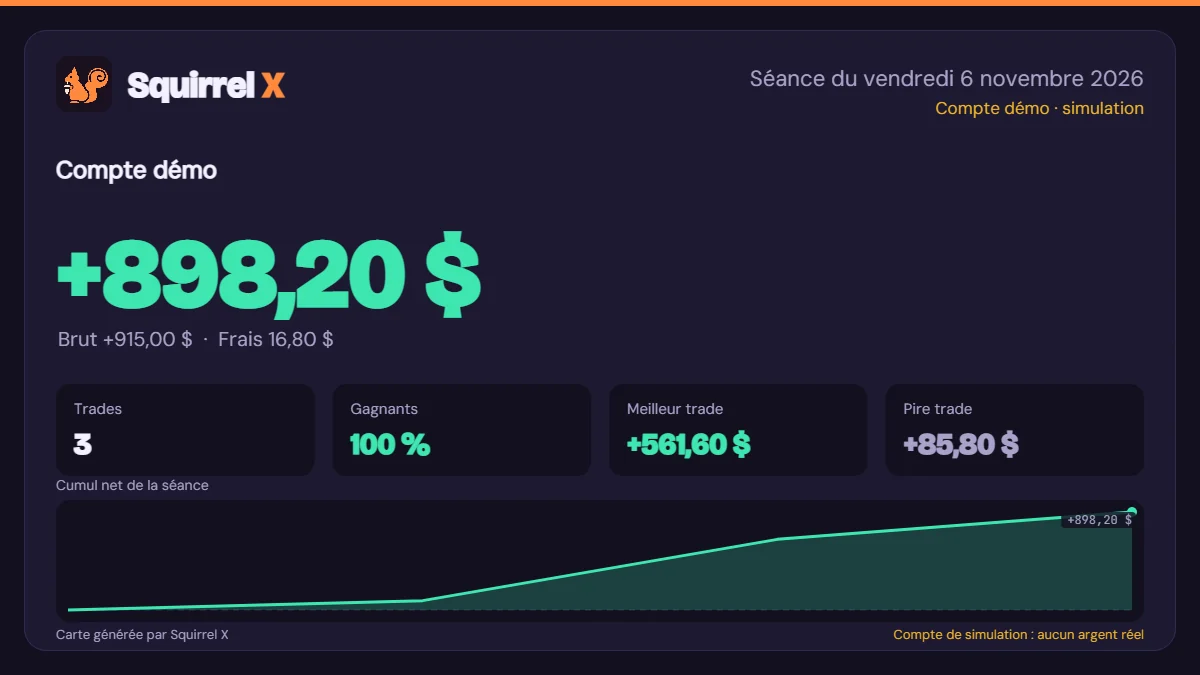
- Everything at a glanceNet in large type, gross and fees, trades, winners, best and worst trade, session curve, in the colors of your theme.
- The account and the day you chooseOne account, all your real accounts or the demo account, today or a previous session.
- Download or copyAs a PNG, or straight to the clipboard to paste into Discord.
- HonestA card from the demo account says so in plain words: no real money.
Your workspace
Multi-screen
Panels detached to a second screen, gathered in one window in a click, saved layouts.
Color tags
Panels of the same color follow the same instrument and the same account.
Every event heard
Order placed, filled, stop hit, connection lost or back: a sound or a voice per event, or your own.
Always up to date
Signed updates, installed at launch. Color themes and full settings for every panel.
The Academy, inside the application
Short courses to get started with Squirrel X and read order flow, shipped with the application and kept up to date with every version.
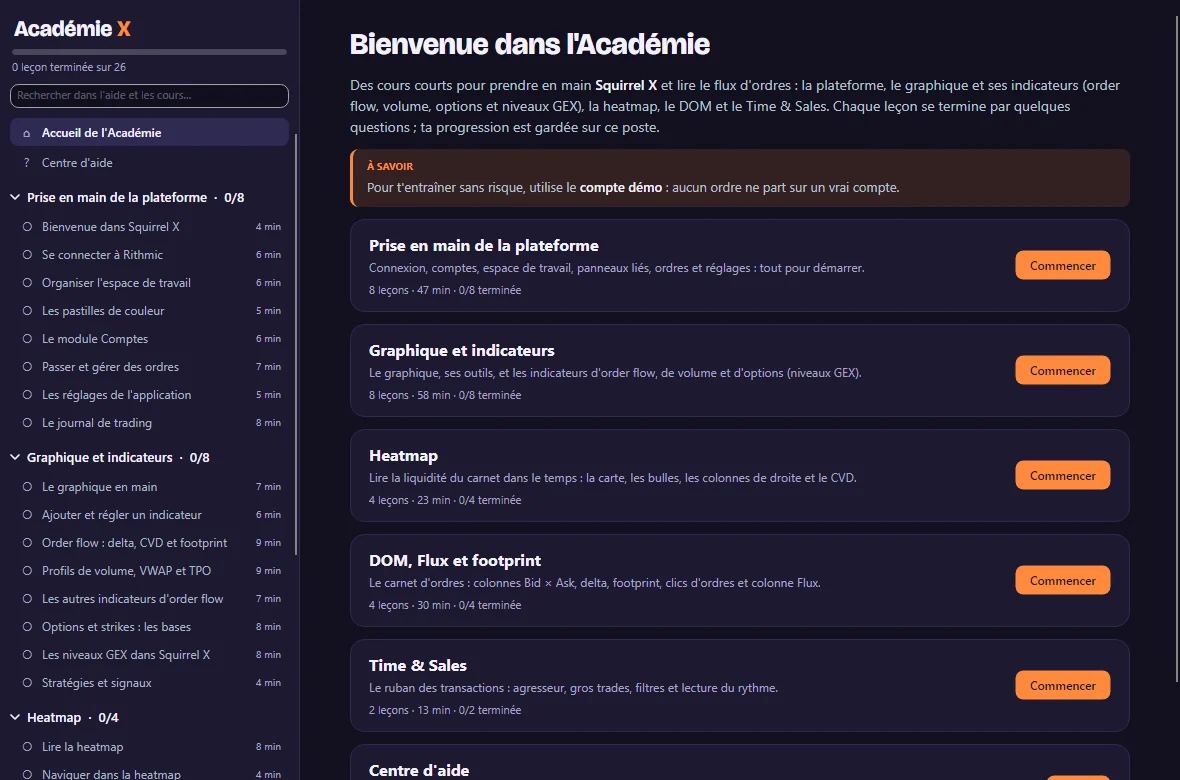
- Five course seriesThe platform, the chart and its indicators, the heatmap, the DOM and its Flow column, the Time & Sales.
- Questions to checkEach lesson ends with a few questions; your progress is kept on your computer.
- Try it right awayLessons open the real panel in one click, with the demo account to practice at no risk.
- A help centerShort sheets for frequent questions, a search across all lessons, and a Help button in the settings of every panel.
The Academy lessons are currently written in French; the application itself is available in English.
The home page
Connections, demo account, day P&L, session card, journal and Academy, before you even open the platform.
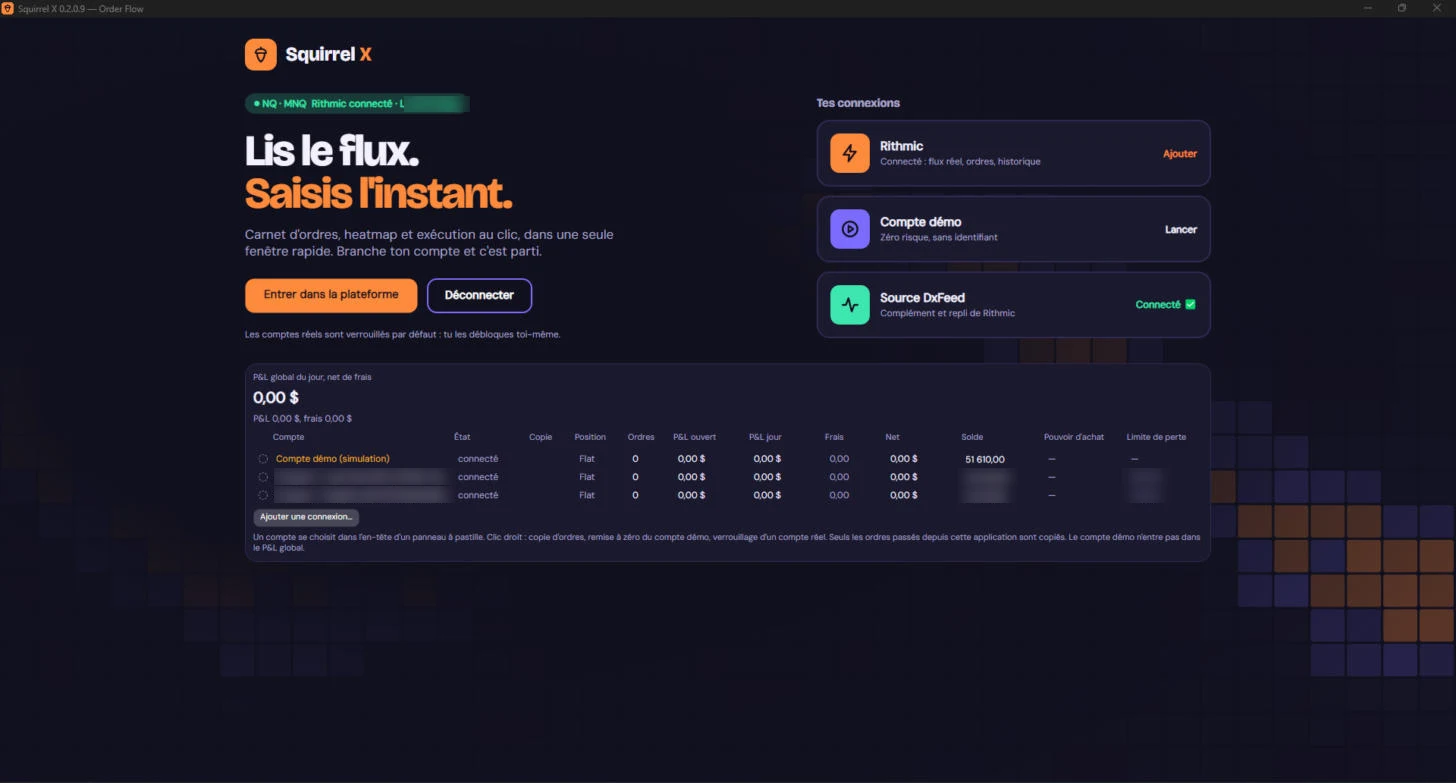
Names and balances of real accounts are blurred.